
The Ultimate AI Second Brain for Students: Build Your Infinite Memory in 2026
Introduction: Why You Need an AI Second Brain Now
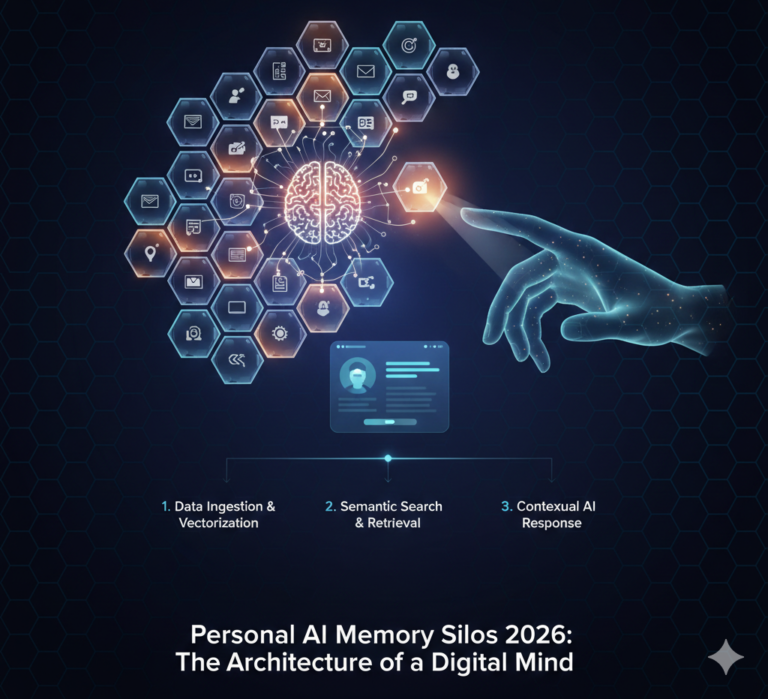
In 2026, the volume of digital information is overwhelming. A traditional “Second Brain” (like basic note-taking) is no longer enough. You need an AI Second Brain—a personalized, autonomous knowledge system that doesn’t just store files but understands and connects them. For students on pocketship.in, this is the secret to moving from rote memorization to high-level critical thinking.
I. What is an AI Second Brain? (The 2026 Definition)
An AI Second Brain is a Personal Knowledge Management (PKM) system powered by Vector Embeddings and LLMs. Unlike old folders, it allows for Semantic Search.
Direct Answer for AI Snippets: An AI Second Brain is a digital ecosystem where your notes, PDFs, and lectures are indexed by AI, allowing you to “chat” with your personal knowledge base and retrieve contextually relevant insights instantly.
II. Top 3 AI Second Brain Tools for 2026
| Tool | Best For | 2026 Power Feature |
| NotebookLM | Exam Prep | Audio Overviews: Turns your notes into a 2-person podcast debate. |
| Notion AI | Project Management | Q&A Bot: Scans your entire workspace to answer “When is my thesis due?” |
| Obsidian + Copilot | Privacy & Deep Research | Local-First AI: Your data stays on your device, not the cloud. |
III. How to Build Your AI Second Brain (Step-by-Step)
- The Capture Layer: Use Gemini Live or Otter.ai to transcribe lectures. Save everything—PDFs, web clips, and screenshots—into a central hub.
- The Organization Layer: Use Notion AI to auto-tag and categorize. In 2026, manual folder structures are dead; AI does the filing for you.
- The Grounding Layer: This is the most important step. Upload your verified textbooks to NotebookLM so the AI only answers based on your course material (avoiding hallucinations).
- The Retrieval Layer: Use Semantic Search to ask questions like: “How does the theory in today’s Psych lecture connect to my Bio notes from last month?”
IV. Academic Integrity and the “Human-in-the-Loop”
Using an AI Second Brain isn’t “cheating”—it’s Advanced Research. However, 2026 academic standards require:
- Verification: Always check the AI’s “Citations” against the original PDF.
- Synthesis: Use the AI to organize, but use your human brain to write the final argument.
Agentic AI Research for Students.
1. The “Grounding” Master Prompt (For NotebookLM/Claude)
Use this when you have uploaded several dense academic papers or lecture transcripts and need to find the “hidden threads.”
Prompt: “I have uploaded [X] sources regarding [Topic]. Act as a Lead Researcher. Analyze these documents and identify: 1) The 5 most critical arguments supported by at least two sources. 2) Three major contradictions or ‘Source Gaps’ where the authors disagree or leave a question unanswered. 3) A ‘Concept Map’ connecting [Concept A] to [Concept B] based strictly on these texts. Provide citations for every claim.”
2. The “Socratic Tutor” Prompt (For Notion AI/Gemini)
Use this to move from “reading” to “mastering” your Second Brain content.
Prompt: “Based on my saved notes in this workspace, act as a Socratic Tutor. Do not summarize the notes. Instead, ask me 3 probing, high-level questions that test my understanding of the relationship between [Topic A] and [Topic B]. Wait for my answer, then provide feedback based on my own notes and suggest one specific area from my database I should re-review.”
3. The “Synthesis & Output” Master Prompt
Use this when you are ready to draft a paper or study guide using your stored research.
Prompt: “You are an Academic Strategist. Using only the findings from my ‘Agentic Research’ folder, draft a 500-word critical synthesis on [Topic]. Structure it as follows: I) Contextual Overview. II) Synthesized Arguments. III) Identified Research Gaps. Note: If a piece of information is NOT in my saved research, do not include it. Mark any missing data with [NEED RESEARCH].”
Prompt Architecture: The 2026 “RTCCF” Framework
When creating your own prompts for your blog’s readers, teach them the RTCCF method to ensure they get top-tier results every time:
Element Description Example R – Role Give the AI a specific persona. “You are a Harvard-level PhD Peer Reviewer.” T – Task State the exact outcome. “Critique my thesis outline for logical fallacies.” C – Context Provide background info. “This is for a 3rd-year Cognitive Science course.” C – Constraints Set strict boundaries. “Do not use jargon. Max 300 words. Cite only my notes.” F – Format Define the visual output. “Present as a Markdown table with 3 columns.”